











Short answer
Microsoft Fabric integrates data ingestion, transformation, storage, analytics, and reporting into a unified platform built on OneLake with Microsoft Purview as the integrated governance layer. For governance programs, Fabric’s key architectural implications are: OneLake provides unified metadata and lineage across all Fabric workloads natively; Purview provides catalog, lineage, data map, and policy capabilities integrated into the platform rather than bolted on; Fabric workspaces function as governance boundaries for domain-level data separation and access control. Fabric does not automatically solve data quality, data ownership, or governance operating model design; those remain in governance program decisions. Organizations with existing governance investments (a non-Purview catalog, a dedicated lineage tool, an established data quality platform) face specific integration decisions about whether to consolidate into Purview or maintain existing tools alongside Fabric.
Microsoft Fabric arrived as a response to a real problem: enterprise data estates had fragmented across too many specialized tools. Ingestion in one product, transformation in another, storage in a third, analytics in a fourth, reporting in a fifth, with governance bolted onto each separately. Fabric’s proposition is consolidation: one platform, one storage layer (OneLake), one identity model, one governance layer (Purview).
For organizations with existing governance programs, this consolidation creates a different challenge. Fabric makes unified governance architecturally possible, but the architectural possibility only becomes governance value when the configuration decisions are made deliberately: how workspaces map to data domains, where the catalog system of record lives, how lineage from non-Microsoft platforms connects to the Purview graph, and what data quality standards govern each medallion tier. This article addresses each of those decisions directly.
Table of Contents:
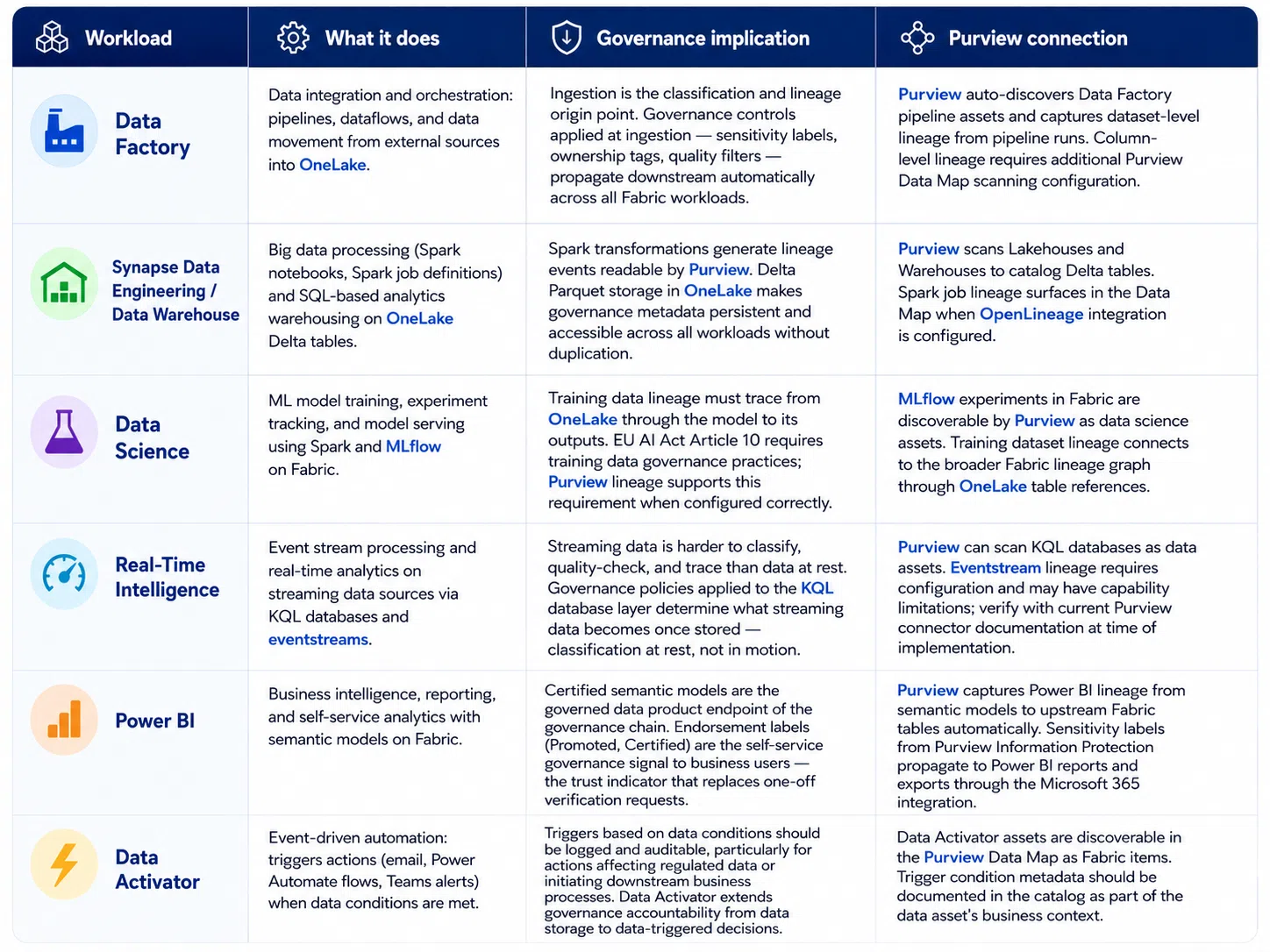
What Microsoft Fabric Includes and the Governance Implications of Each Workload The six workloads and what each means for metadata, lineage, access control, and quality governance
| Evaluate Direct Monitor | ISO/IEC 38505-1:2017 defines three governance responsibilities for data: Evaluate (assess current and future use of data), Direct (set direction through policies and strategies), and Monitor (track conformance and performance). Microsoft Fabric’s architecture is designed to provide a single platform substrate for all three: OneLake as the evaluation and monitoring data foundation, Purview policies for direction, and cross-workload lineage for conformance monitoring. Source: ISO/IEC 38505-1:2017, Governance of Data, Application of ISO/IEC 38500, International Organization for Standardization |
|---|
Is Your Governance Ready for Microsoft Fabric?
Assess your governance maturity across data ownership, quality, metadata, lineage, security, and access before scaling your Fabric environment.
Data Governance Maturity Assessment
A structured diagnostic for CDOs, CIOs, and Chief Compliance Officers. 18 questions across six governance dimensions. Receive a scored maturity profile and prioritised recommendations.
Your Details
Your Assessment Results
Overall Governance Maturity Level
Receive Your Full Report
A BluEnt governance consultant will prepare a personalised report with specific recommendations for your highest-priority gaps. Book a 60-minute discovery call to discuss your findings.
OneLake as the Governance Foundation What OneLake provides for governance and what the governance program must configure to use it effectively
OneLake as unified metadata substrate
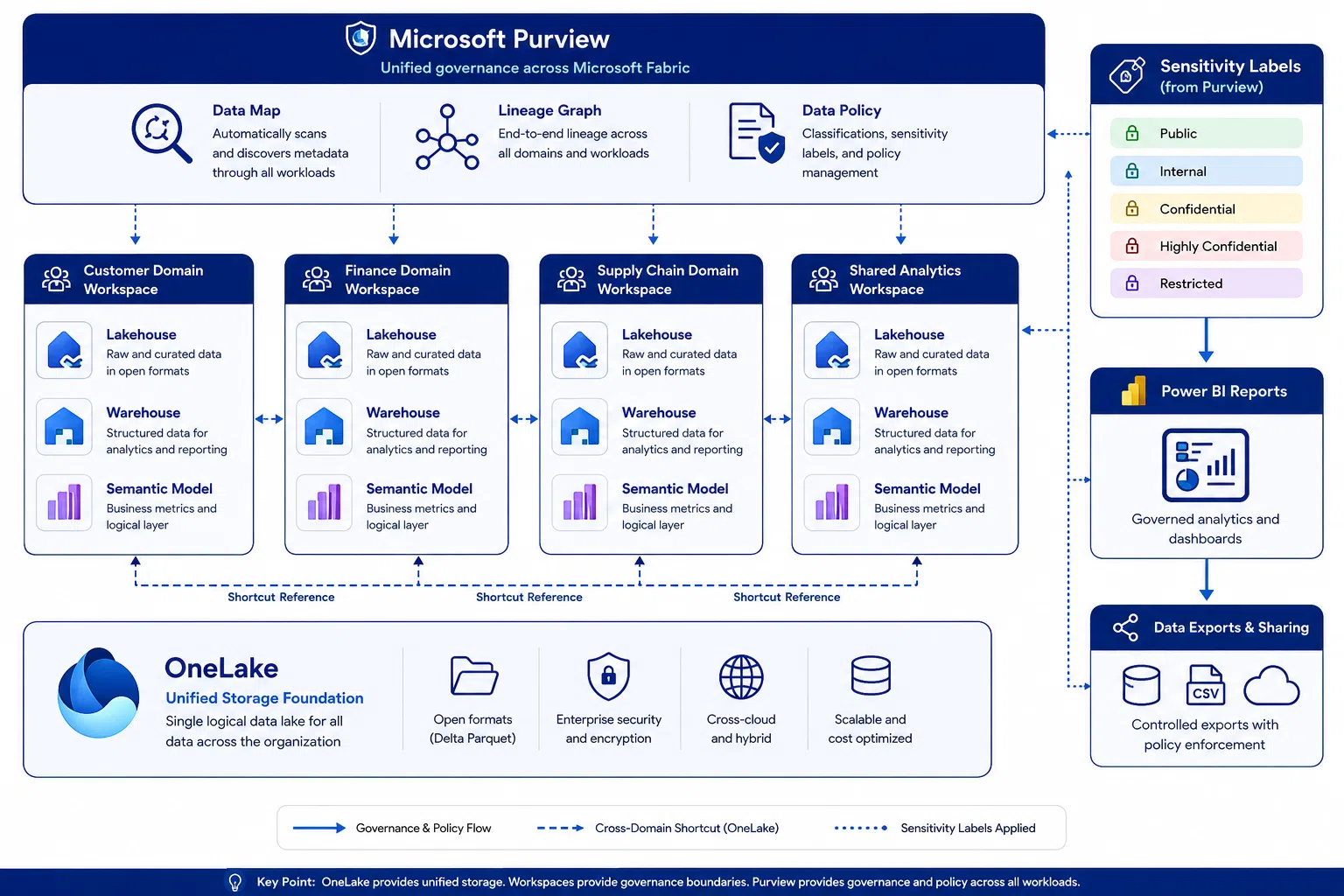
OneLake is Microsoft Fabric’s single logical data lake: all Fabric workloads read from and write to OneLake. Data stored in a Fabric Lakehouse, a Fabric Data Warehouse, Power BI semantic model caches, and Real-Time Intelligence KQL databases all share the same underlying storage layer. The governance implication is that classification, ownership, and access policies defined at the OneLake level propagate to all workloads accessing the same data, eliminating the per-workload governance configuration overhead that fragmented data estates require.
OneLake governance operates at the Fabric workspace and item level. A Fabric workspace corresponds to a data domain or project; it contains the Lakehouse tables, Notebooks, Pipelines, and Semantic Models for that scope of work. Access control applies at the workspace level and at the item level within it. Row-level and column-level security apply within items at the semantic model or Lakehouse table level.
Workspace design as governance domain mapping
The Fabric workspace is the primary governance boundary. A well-designed workspace structure maps to the organization’s data domain structure: a customer domain workspace, a Finance domain workspace, a Supply Chain workspace, each owned by the corresponding data domain owner and with access controls aligned to that domain’s sensitivity tier. Cross-domain data sharing is handled through OneLake shortcuts (references from one workspace to data in another without copying it) or through governed semantic models published to a shared analytics workspace.
The consequence of getting workspace structure wrong is governance complexity that compounds as the Fabric environment grows. Cross-project access is harder to audit; domain ownership accountability is unclear when data spans multiple project workspaces, and Purview classification must be applied at the item level across many workspaces rather than at the domain workspace level. The workspace-to-domain mapping decision should be made, and documented, before the first Lakehouse is created, not retrofitted after.
The medallion architecture and governance tiers
Most Fabric implementations adopt a medallion architecture within each domain workspace: Bronze (raw ingested data, minimal transformation), Silver (cleaned, validated, conformed data), Gold (business-ready, certified data products). For governance, the medallion layers map directly to a maturity of progression. Bronze data is minimally governed, classification and ownership assigned, no quality SLA. Silver meets the domain’s quality standard and is eligible for internal analytics. Gold has met the full governance standard, quality SLA, certified in catalog, lineage complete, and is what business users and downstream consumers access.
Note: Fabric workspace naming conventions directly affect Purview Data Map discoverability. Workspaces named with a consistent schema (Domain_Environment: Customer_Production, Finance_Dev) make it possible to filter the Data Map by domain and environment, essential for governance reporting and scoping access reviews. Workspaces named by project or individual analyst create a Data Map that is difficult to navigate for governance purposes. Establish and enforce naming conventions through Fabric admin settings before the environment is populated.
Build a Governed Microsoft Fabric Architecture
Design a Fabric environment with governance, security, lineage, and access controls built into the data architecture from the start.
Purview Integration: Catalog, Lineage, and Policy in Fabric What Purview provides natively and where its governance capabilities require supplementation
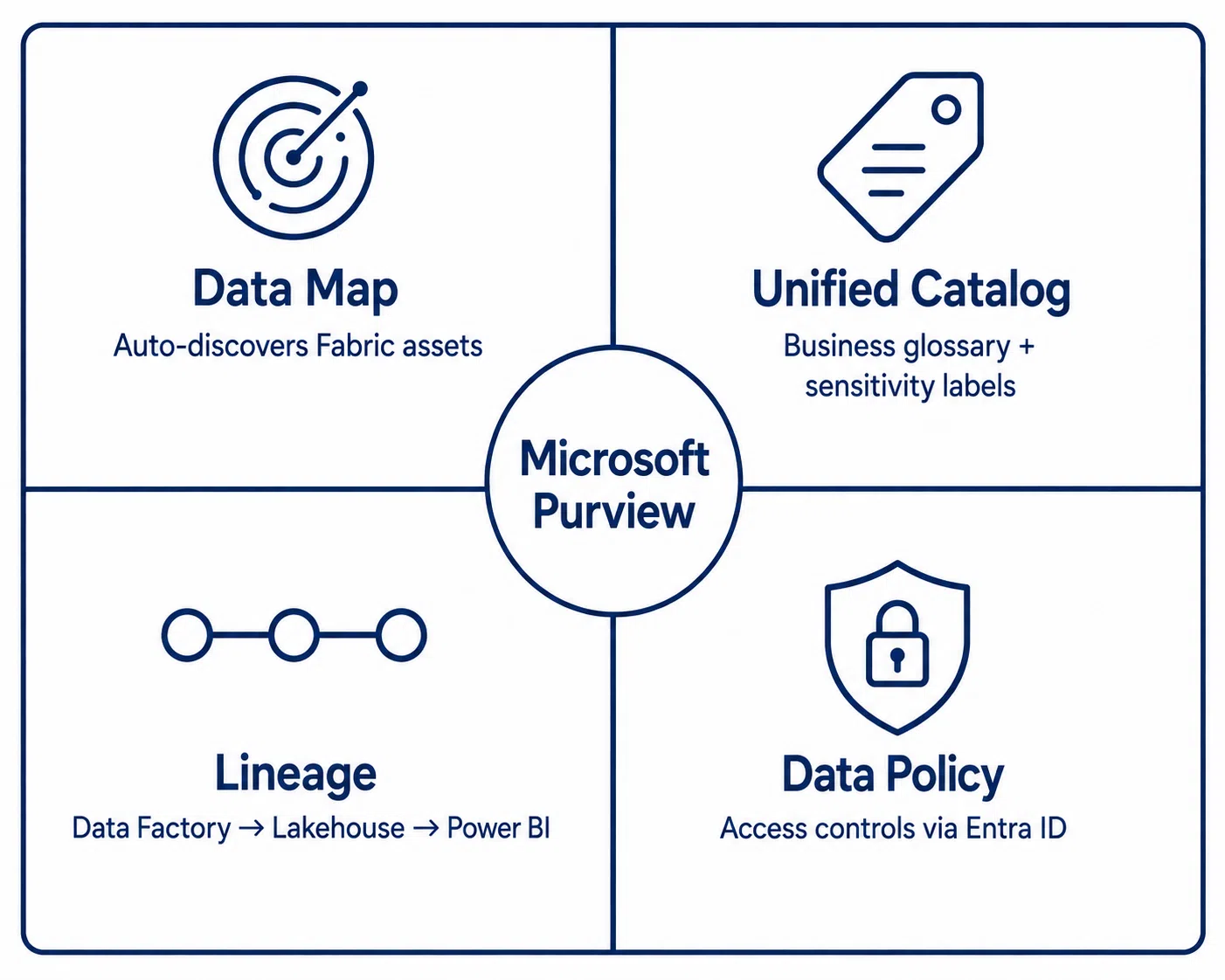
Microsoft Purview provides four core governance capabilities within Fabric: a Data Map for automated discovery and cataloguing of Fabric assets across all workspaces; a Unified Catalog with business glossary, data asset pages, and sensitivity label management; automated cross-workload lineage from Data Factory pipelines through Lakehouse transformations to Power BI reports; and Data Policy for access controls managed through Purview rather than configured individually in each Fabric item.
The integration between Fabric and Purview is native: Fabric assets auto-register in the Purview Data Map without separate scanner configuration. The governance significance is that Purview’s cross-workload lineage, spanning the full Fabric estate in a single graph, is genuinely difficult to replicate with third-party tools, where separate connectors are required for each workload and the lineage graph must be assembled from multiple sources.
Where Purview’s governance coverage requires supplementation
Purview’s lineage coverage is strongest within the Microsoft ecosystem and weaker for external sources. If the Fabric data estate includes significant data from Databricks, Snowflake, Salesforce, or other platforms connected via OneLake shortcuts or Data Factory connectors, the cross-platform lineage graph in Purview may have coverage gaps at those boundaries. For multi-platform data estates, a hybrid approach, Purview for Fabric-native lineage, a third-party lineage tool for cross-platform flows, is more common than a Purview-only strategy.
Purview’s data quality capabilities are scanning-based and classification-based: they identify quality issues through pattern matching and statistical profiling, not through continuous monitoring against defined business rules. For organizations with formal data quality SLAs, DAMA quality dimensions, or regulatory quality requirements (BCBS 239 accuracy principle), a dedicated data quality platform integrated with Fabric’s Lakehouse tables provides the rule-based monitoring and steward alert workflow that governance programs require.
From the field
The most common Purview integration mistake in Fabric implementations is treating automatic asset discovery as equivalent to a governed catalog. Purview scans Fabric workspaces and populates the Data Map with asset metadata automatically, creating the appearance of a complete catalog quickly. What it does not do automatically is assign business owners, link assets to business glossary terms, classify data beyond automated sensitivity detection, or establish stewardship accountability. An auto-discovered Data Map with no ownership, and no glossary linkage is an inventory. Converting it into a governed catalog requires the same stewardship operating model as the platform infrastructure supports but cannot replace it.
Recommended Reading:
Integrating Fabric with Existing Governance Programs The catalog, lineage, quality, and access control integration decisions for organizations with existing governance investments
Organizations adopting Fabric with an existing governance program, a Collibra or Atlan catalog, a dedicated lineage tool, a data quality platform, an established RBAC model, face integration decisions that are not primarily technical. Technical connectors exist. The governance question is how to design the integration so that metadata is consistent across systems rather than duplicated and divergent.
| Existing capability | Fabric / Purview equivalent | Decision options | Recommended approach |
|---|---|---|---|
| Existing data catalog (Collibra, Atlan, DataHub, Alation) | Microsoft Purview Unified Catalog with Fabric asset auto-discovery | Consolidate into Purview; maintain existing catalog with Purview as feeder; maintain existing catalog as system of record with Fabric items registered via connector | If the existing catalog has mature business glossary, stewardship workflows, and cross-platform coverage Purview does not yet match maintain existing catalog as system of record and federate Fabric asset metadata from Purview via API. If starting fresh or if Purview matches existing capability: consolidate to reduce integration complexity. |
| Existing lineage tool (Atlan, Collibra, OpenLineage/Marquez) | Microsoft Purview Data Map with native Fabric cross-workload lineage | Consolidate into Purview for Fabric-native lineage; maintain existing tool for multi-platform lineage; federate lineage between Purview and existing tool | Purview handles Fabric-internal lineage well. For multi-platform estates with Databricks, Snowflake, or other non-Microsoft platforms: maintain existing lineage tool for cross-platform flows and use Purview for Fabric-internal lineage, with one system designated as the lineage record of record for governance reporting. |
| Existing quality platform (Great Expectations, Soda, dbt tests, Informatica) | Microsoft Purview data quality scanning (pattern-based, profiling) | Consolidate into Purview quality scanning; maintain existing quality platform; run both and deduplicate | Purview quality scanning is adequate for initial data profiling. For formal quality SLAs, DAMA quality dimensions, or regulatory requirements: maintain the existing quality platform and integrate quality scores with the Purview catalog via API so quality status is visible in the catalog without requiring users to navigate two systems. |
| Existing access control (Snowflake RBAC, AWS Lake Formation, custom ABAC) | Microsoft Fabric workspace/item permissions + Purview Data Policy + Microsoft Entra ID | Migrate all access control to Fabric/Purview/Entra ID; maintain existing controls for non-Fabric systems; operate a hybrid model during migration | For data that remains in non-Fabric systems: maintain existing access controls. For data moved to OneLake: migrate to Fabric workspace/item permissions enforced through Entra ID, with Purview Data Policy for attribute-based access to sensitive data. Mirror the existing domain ownership structure, do not redesign access governance and migrate Fabric simultaneously. |
Note: The governing principle for Fabric integration in an existing governance program: do not create a situation where the same data asset has conflicting classification, ownership, or lineage records in Purview and an existing catalog. Inconsistent metadata across systems is worse than no metadata; users and governance tools cannot determine which record is authoritative. Establish a clear system-of-record designation for each metadata type before Fabric onboarding begins, not after the first inconsistency appears.
The bottom line
Microsoft Fabric makes unified data governance architecturally achievable for Microsoft-centric organizations. OneLake removes metadata fragmentation. Purview’s native integration removes the lineage instrumentation overhead that separate tools require. Workspace-to-domain mapping makes access governance explicit and auditable. These are genuine efficiency gains, but the organizations that realize them are the ones that treat platform adoption as a governance design opportunity: mapping workspaces to domains before the first Lakehouse is created, and establishing catalog and quality standards before auto-discovery produces a backlog of ungoverned assets.
-
Design Fabric workspace structure to match governance domain structure at project inception, retrofitting is significantly more expensive
-
Purview auto-discovery creates an inventory, not a governed catalog; business owner assignment, glossary linkage, and stewardship accountability must be added deliberately
-
Purview provides the strongest governance value for Fabric-internal cross-workload lineage; multi-platform estates need a hybrid lineage approach with a designated system of record
-
Purview quality scanning is a starting point; formal quality SLAs and regulatory quality requirements need a dedicated quality platform integrated with Fabric’s Lakehouse layer
-
Medallion architecture governance standards, what data must meet to progress from Bronze to Silver to Gold, are governance program decisions, not Fabric configuration decisions
Design your Microsoft Fabric governance architecture before you build
BluEnt works with data teams and governance leads to design Microsoft Fabric governance architectures: workspace-to-domain mapping, Purview integration strategy, medallion architecture governance standards, catalog and lineage integration decisions, and quality program design for the Fabric data estate.
Common Questions What data architects and CDOs ask about governance for Microsoft Fabric environments
Do we need Microsoft Purview to govern a Microsoft Fabric environment?Purview is not strictly required, but it is the most integrated governance option for Fabric and requires the least additional engineering effort for cross-workload visibility. Fabric assets auto-register in the Purview Data Map, lineage is captured natively across Fabric workloads, and sensitivity labels from Purview Information Protection propagate directly to Fabric items and Power BI reports. Using a third-party catalog instead of or alongside Purview is valid when the organization has a mature existing catalog with capabilities Purview does not yet match, but it requires building and maintaining API integrations to keep the third-party catalog current with Fabric asset changes. The question is not whether Purview is better in absolute terms, but whether the integration overhead is justified by the capability gap.
How do we handle governance for data in OneLake shortcuts vs data native to OneLake?OneLake shortcuts allow Fabric to reference data stored outside OneLake (in Azure Data Lake Storage Gen2, Amazon S3, Google Cloud Storage, or other sources) without copying it. Governance implications: data accessed through a shortcut is subject to Fabric and Purview governance metadata, but access control applies at both the shortcut level (Fabric workspace and item permissions) and the underlying storage level (the original storage account permissions). Lineage for shortcut data shows the shortcut reference but may not show origin lineage within the external system unless that system also has Purview or OpenLineage integration. For governance purposes, treat shortcut-accessed data with the same classification and stewardship requirements as native OneLake data, and document the external source in the catalog asset record, so the origin is auditable.
What is the right governance approach for Power BI semantic models in Fabric?Power BI semantic models are the governed data product layer in Fabric, the curated, business-ready view of Lakehouse or Warehouse data that self-service analysts consume. Governance has three components. Endorsement: Promoted (quality reviewed by owner) and Certified (meets organizational standards, reviewed by a designated certifier) labels are the primary governance signal to self-service users. Certified semantic models should map Gold-tier data. Sensitivity labels: labels from Purview Information Protection applied to semantic models propagate to reports, exports, and downstream uses, the primary classification enforcement point for the reporting layer. Lineage: the Purview lineage from Lakehouse tables through semantic models to Power BI reports is the traceability chain connecting governed source data to the reports business decisions are based on.
How does Fabric compare to Databricks for data governance?Microsoft Fabric and Databricks both offer unified data platform architectures with integrated governance layers, and many enterprises use both. The governance comparison focuses on four areas. Catalog and lineage: Fabric uses Purview natively; Databricks uses Unity Catalog natively. Both capture cross-workload lineage within their ecosystems; cross-platform lineage between the two typically requires OpenLineage integration on both sides. Access control: both provide workspace-level access with column-level and row-level security; Fabric uses Microsoft Entra ID, which aligns with existing Microsoft 365 identity infrastructure. Data quality: Neither has a complete native quality program equivalent to a dedicated quality tool. AI governance: both use MLflow for experiment tracking; Fabric uses Purview for model asset governance. For organizations deeply embedded in the Microsoft ecosystem, Fabric’s native integrations reduce governance overhead. For mixed or Databricks-first estates, both platforms typically coexist with governance coordinated across them.
How do we govern Fabric Copilot and AI features from a data governance perspective?Microsoft Fabric includes Copilot capabilities, AI-assisted code generation, natural language queries, and data summarization, that operate on data within the Fabric environment. Three governance considerations apply. Data access: Copilot generates responses based on data the user has access to within their workspace; access controls applied through workspace permissions and sensitivity labels determine what Copilot can reference. Output governance: Copilot-generated code (DAX, SQL, Python) that modifies data or creates new assets should be subject to the same catalog documentation requirements as manually written transformations. EU AI Act compliance: if Copilot outputs feed into regulated AI systems, EU AI Act Article 10 data governance standards apply to the Fabric datasets it accesses. Verify current Microsoft documentation on Copilot for data handling and tenant settings before deploying Copilot in regulated environments.

 Governing AI Tools in AEC: Copilot, Digital Twins, and Generative Design
  Data Governance for AI and Advanced Analytics: Building the Foundation That Works
  Centralized vs. Federated vs. Hybrid Data Governance: Which Model Fits Your Organization
  Data Governance Roles and Responsibilities in AEC Organizations