
Design automation, construction data and AI-readiness, built by the people who produce the drawings your systems describe.
- Producing AEC drawings since 2003
- Microvellum, Cabinet Vision and CNC output in daily production
- Procore, Sage, Viewpoint and CMiC integration
“Modelling work repeats, and the hire can’t be made”
Design Technology & Automation- Services
- Templates, Standards & Deployment
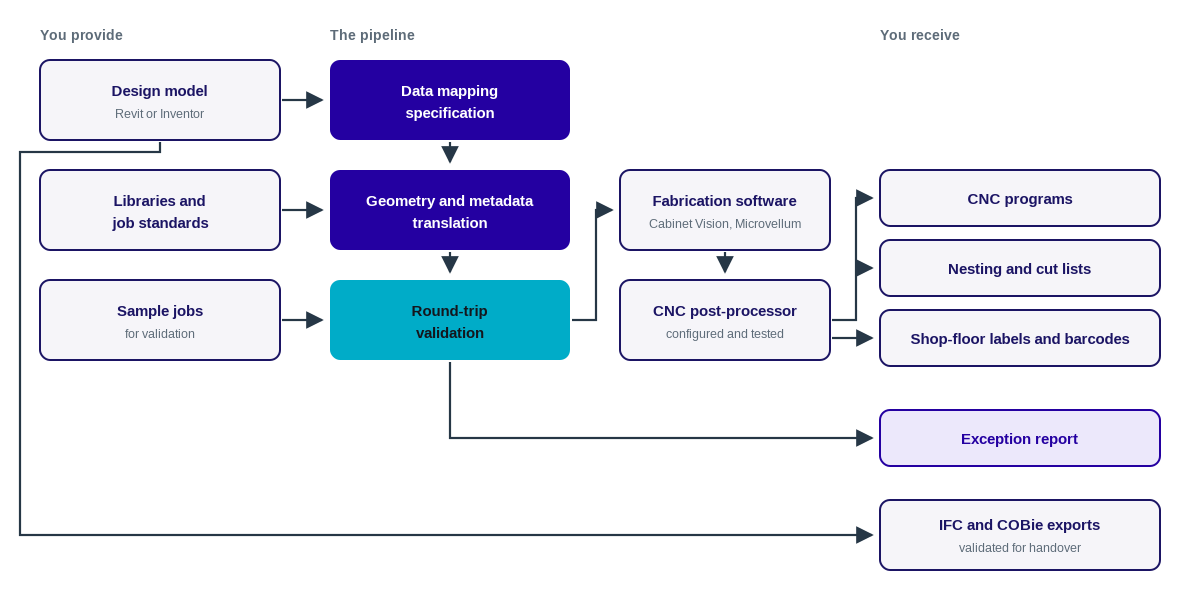
- Interoperability & Fabrication PipelinesDesign-to-Fabrication AutomationRevit to Cabinet Vision & MicrovellumCNC Post-Processor ConfigurationIFC & COBie Export Automation
- Workflow & Platform OrchestrationWorkflow Orchestration BuildProcore & ACC Data Workflows
“The numbers don’t tie across your systems”
Construction Data & Project Controls- Services
- Source System IntegrationProcore Data IntegrationSage 300 CRE & Viewpoint ExtractionIntegration Remediation
- Construction Data Warehouse & ModellingSingle-Source Pipeline BuildProject & Vendor Master DataHistorical Backload & Archive Rationalisation
- Project Controls & ReportingWIP & Margin ReportingPreconstruction & Bid AnalyticsCost & Schedule Integration
“Your AI initiative stalled on the data underneath”
Information Governance & AI-Readiness- Services
- Assessment & DiagnosticsAI-Readiness AssessmentCopilot Readiness & Document Estate Audit
- Standards & ClassificationStandards & Classification Framework
- AI Governance & Data HandlingAI Governance FrameworkData-Sharing & IP Protection Posture
- Applied AI for AEC
- Information HubScattered Project DataKnowledge From Meetings, Email & DocumentsClient-Specific Quality ChecksAI-Ready Document EstateCDE Structure & Rollout
Data platforms, analytics, governance and AI that the business can trust, from first pipeline to production AI.
- Long-tenure Tableau analytics for WellSky
- Gift-card and redemption reconciliation for Gearbox and Epic
- SOC 2 Type I and Type II attestations held
“Data is spread across systems nobody trusts”
Data Engineering & Modern Platforms“Reports take days and still disagree”
Analytics & BI“No one owns the data, or its quality”
Data Governance & AI-Readiness“AI pilots never reach production”
AI & GenAI IntegrationWhat we do
Automation and project data, from AEC production specialists since 2003.
- Producing AEC drawings since 2003
- Microvellum, Cabinet Vision and CNC output in daily production
- Procore, Sage, Viewpoint and CMiC integration
“Modelling work repeats, and the hire can’t be made”
Design Technology & Automation“The numbers don’t tie across your systems”
Construction Data & Project Controls“Your AI initiative stalled on the data underneath”
Information Governance & AI-ReadinessEnterprise data platforms, analytics, governance and AI.
- Long-tenure Tableau analytics for WellSky
- Gift-card and redemption reconciliation for Gearbox and Epic
- SOC 2 Type I and Type II attestations held
“Data is spread across systems nobody trusts”
Data Engineering & Modern Platforms“Reports take days and still disagree”
Analytics & BI“No one owns the data, or its quality”
Data Governance & AI-Readiness“AI pilots never reach production”
AI & GenAI Integration